

Start from the job in front of you. Each workflow states what it is for, what it needs, what it produces, what you check, where its authority stops, and which file it runs on. One file can serve more than one job.
For a quick first step, open the Mental Model Scorecard and score a company you know well. Paid subscribers already have full app access. Or choose the stage below that matches the work you are doing.
The investment process
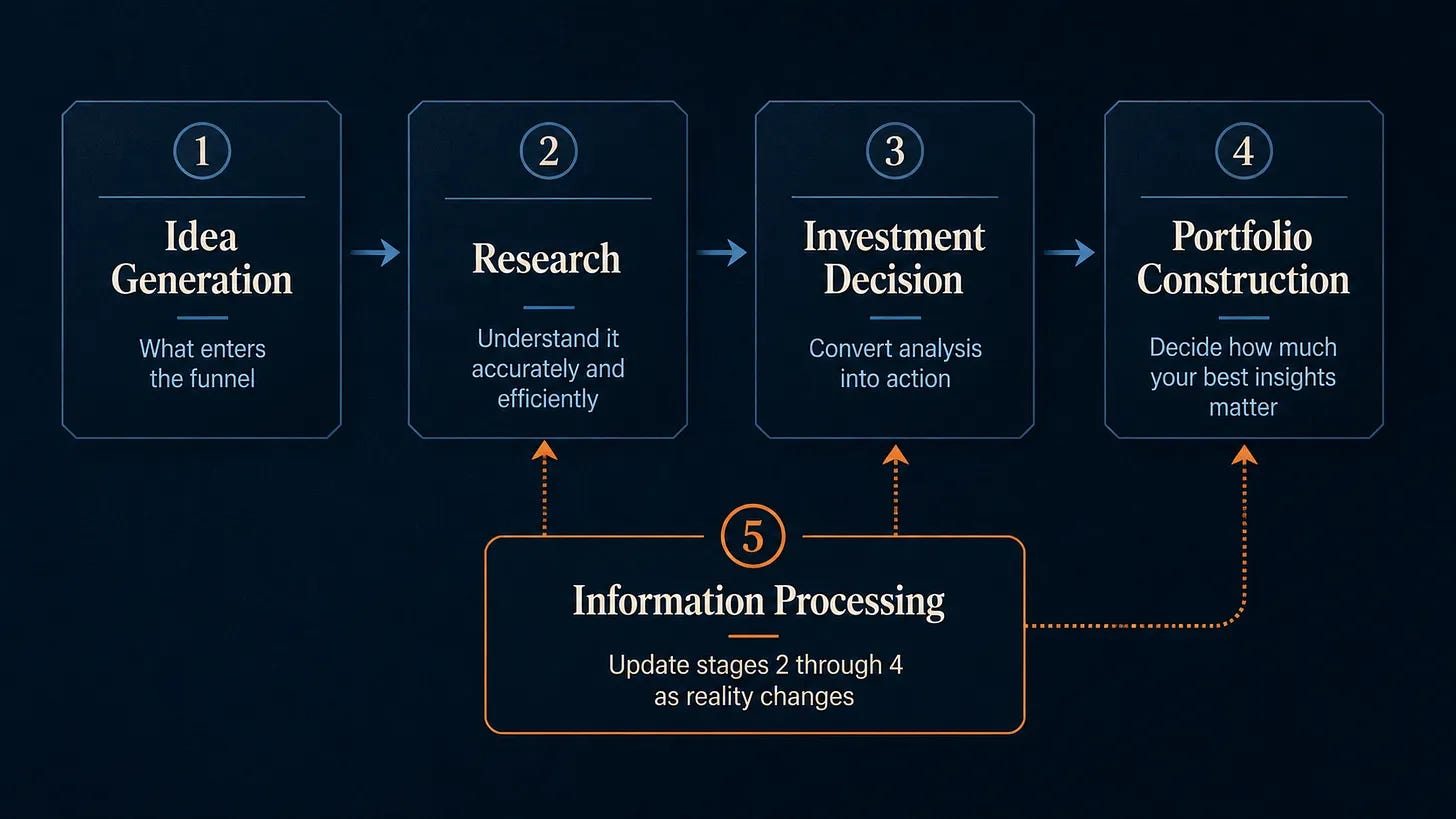
The article uses five broad stages. In the Toolkit, I split the first stage into two separate jobs: 1A. Idea Generation, which fills the funnel, and 1B. Idea Triage, which determines what deserves deeper research. The workflows are organized by the job you are doing. When one asset supports more than one job, it appears in more than one stage. The Scorecard supports idea triage, assessment after research, position-sizing judgment, and monitoring holdings or watchlist companies.
Jump to a stage:
What to expect from the Claude Skills
Claude Skills are useful but imperfect. Current models can miss a fact, misread a source, skip a field you asked for, use something stale, or state a conclusion with more confidence than the evidence carries. Those limits are structural. They vary by model and they vary by run.
Even with those limitations, I have found the workflows I am sharing with you to be very useful as long as they are used for their intended purpose. They save time and help you find patterns that you might have missed. As a result, I have been able to look at a lot more investing candidates and triage them much faster than I could have done without the help of AI.
Every Claude workflow below was run on a representative case before it was listed here. Its card carries what you have to verify, and its guide records what I saw go wrong. The intended output is a target. It is not a promise of identical format, identical coverage, or an identical conclusion across models and runs.
Files live in Downloads. Open the catalog in a web browser.
Complimentary members: access your downloads here.
Before you start
For these Claude workflows, use Claude at claude.ai in a web browser. Install and enable the relevant skill, and turn on Code execution and file creation.
To use the full collection, you will need a separate paid Claude subscription, such as Pro or Max. For workflows marked Research required, turn on Research and web search before starting.
The Mental Model Scorecard and PULSE do not require Claude.
1A. Idea Generation
Special Situations Country Sweep
Use it when: you want a country-level list of recent and upcoming event-driven situations before deciding where deeper work is worth the time.
Needs: a country, a lookback and look-forward window, and an optional market-cap floor.
Claude setup: paid Claude plan · Research required · web search enabled
Produces: a sourced triage list with category counts, catalyst timing, and a dated methodology note.
You check: a sample of the tickers, the cited source for anything you pursue, and whether the event is still live.
Where it stops: a name on the list is a lead. It is not evidence that a security is mispriced or that it deserves deeper work.
Runs on: Special Situations Screener · Access: all paid
These results are a starting point for further digging, not recommendations, even if the model occasionally uses language that sounds like one. The operating guide records the limitations found in the Canada runs.
1B. Idea Triage
Build a Sourced Company Overview
Use it when: you need a structured first orientation to a public company.
Runs on: Company Overview Deck · Access: free
See how it works: Read the article
Try it free: Get the Company Overview Deck Skill and use code YZMDK4NQ for 100% off. No payment information is required after you apply the code.
Score and Prioritize a New Idea
Use it when: you have several ideas and need to decide which deserve deeper research.
Needs: one company, your preliminary answers to the 8 default questions, and a written bear case.
Steps: set the questions and weights before scoring. Answer with the evidence you have, note what remains uncertain, and compare candidates using the same settings.
Produces: a research priority and a list of questions to investigate.
You check: whether uncertain answers or one serious weakness change that priority. Review the answer pattern as well as the total.
Where it stops: the score reflects your answers and weights. It cannot establish value or determine whether an investment is suitable.
Runs on: Mental Model Scorecard · Access: limited browser access for everyone; paid subscribers can customize questions, save entries, compare them, and view trends
Route: Open the Scorecard
Management Compensation and Incentives Review
Use it when: you want to check incentive alignment before committing to deeper research, or understand what drives the CEO’s incentive payout, not what the summary paragraph says it drives.
Needs: one U.S. public-company ticker for a domestic issuer that files a DEF 14A.
Produces: the filing metadata, the incentive metrics and their weights, CEO compensation, and an ROI Influence score or a specific reason it cannot be computed.
You check: that it used the definitive proxy, the fiscal year, any CEO transition, the metric classifications, every reported weight, and whether each percentage describes a performance level or a payout level.
Where it stops: the score describes the payout structure. It says nothing about capability, honesty, shareholder orientation, or whether the investment is any good.
Runs on: Proxy Analysis · Access: all paid
The results aren’t always perfect, so check the findings against the filings when it matters.
Run a Fast PULSE Triage Pass
Use it when: you want a fast read on economic profitability, free-cash-flow behavior, leverage, and valuation before choosing what deserves deeper work.
Needs: one equity ticker and the Full PULSE template with Bloomberg codes, opened in desktop Excel with the Bloomberg Excel add-in installed and connected to an active Bloomberg subscription.
Produces: a refreshed PULSE dashboard, the charts, the historical data, and a list of questions to follow up.
You check: Make sure Bloomberg pulled the right company, currency, periods, and current balance sheet. Then look for special charges or other one-off items that could distort the calculations. Bloomberg data is useful, but it is not perfect.
Where it stops: PULSE does not normalize accounting, settle a valuation, or produce a recommendation.
Runs on: Full PULSE template with Bloomberg codes · Access: annual, founding, and complimentary members
Test a New Idea Before Committing to Deep Research
Use it when: a ticker has reached your short list and you want to understand the strongest case against it before committing substantial research time.
Needs: one public company.
Claude setup: paid Claude plan · Research required · web search enabled
Produces: an independent bear-case memo, a stress-test checklist, stated source limitations, and numbered sources.
You check: the latest filings, current balance-sheet and valuation support, transcript citations, and the key claims the argument depends on.
Where it stops: this is an early warning pass. It does not decide whether the company deserves deeper work.
Runs on: Devil’s Advocate · Access: all paid
2. Research
For an early incentive-alignment check, see Management Compensation and Incentives Review in Idea Triage. The same tool can support deeper research.
Map the Competitive Set
Use it when: you are starting deep research and need to decide whose filings, transcripts, industry material, and briefing sources belong in the set.
Needs: one public-company ticker.
Produces: a sourced list of direct competitors and substitutes.
You check: the latest annual filing, segment coverage, current ownership and listings, and legal domicile.
Where it stops: this is a research set, not a valuation peer group. Appearing on the list does not mean the economics are comparable.
Runs on: Competitors · Access: all paid
Check the competitor classifications and current company details before deciding which sources to read. The operating guide records the limitations found in the Accenture run.
3. Investment Decision
Score a Completed Investment Thesis
Use it when: you have completed your research and want to check the candidate against your investment standards before making a decision.
Needs: your completed research, valuation range, downside assessment, and strongest bear case.
Steps: complete the Scorecard using your established questions and weights. Review each weak answer against your research and record any unresolved issue in your investment notes.
Produces: a scored assessment and a documented judgment about whether the candidate meets your standards or needs more work.
You check: the evidence behind the answers, the current price relative to your value range, and any weakness that would rule out the investment regardless of its total score.
Where it stops: the score does not determine expected return, probability of success, or an investment action. The decision remains yours.
Runs on: Mental Model Scorecard · Access: limited browser access for everyone; paid subscribers can customize questions, save entries, compare them, and view trends
Route: Open the Scorecard
Build the Strongest Bear Case Before Acting
Use it when: a case is complete enough that it deserves an independent, sourced attempt to break it.
Needs: one public company.
Claude setup: paid Claude plan · Research required · web search enabled
Produces: a bear-case memo with evidence tags, a stress-test checklist, stated source limitations, and numbered sources. Where the source coverage is too thin, it should produce a preliminary checklist instead of a confident memo.
You check: the latest annual and operating-period filings, current balance-sheet and valuation support, transcript citations, and the key claims the argument depends on.
Where it stops: it does not recommend a trade, a price target, or a position change. Weak evidence should produce a weak or mixed bear conclusion, and if it produces a strong one anyway, that is the thing to check first.
Runs on: Devil’s Advocate · Access: all paid
4. Portfolio Construction
Use the Scorecard to Inform Position Sizing
Use it when: you have assessed an investment candidate and want to check whether a proposed position size is consistent with that assessment.
Needs: the completed Scorecard, your proposed position size, valuation and downside ranges, and the risks already present in your portfolio.
Steps: compare the proposed size with the score and its component answers. Consider the loss you could bear if you are wrong, liquidity, uncertainty, and assumptions shared with other positions. Record your sizing rationale in your investment notes.
Produces: a documented sizing judgment that incorporates the score alongside the portfolio considerations.
You check: whether a high total conceals a serious weakness, whether comparisons use the same questions and weights, and whether several holdings could suffer from the same adverse development.
Where it stops: the app does not calculate a position percentage or assess portfolio risk. A score range alone cannot justify a position size.
Runs on: Mental Model Scorecard · Access: limited browser access for everyone; paid subscribers can customize questions, save entries, compare them, and view trends
Route: Open the Scorecard
5. Monitoring and Information Processing
Re-score a Position After a Material Event
Use it when: material information has arrived about a holding or watchlist company, or your regular review is due.
Needs: an earlier saved Scorecard entry and the new evidence you want to assess.
Steps: score the company again and save a new entry. Compare entries question by question. During a monthly or quarterly review, sort the journal by score change and inspect total and component trend charts.
Produces: a record of how your assessment changed and the research or valuation questions that deserve follow-up.
You check: what changed in the evidence, whether the questions or weights changed, and whether a similar total hides offsetting changes in individual answers. Examine both improving and deteriorating assessments.
Where it stops: score changes identify matters for review. Research, valuation revisions, and any portfolio action require your judgment. Saved entries remain unchanged; re-scoring creates a new record.
Runs on: Mental Model Scorecard · Access: all paid for saved history, comparisons, sorting, and trends
Route: Open the Scorecard
Revisit an Existing Holding With a Fresh Bear Case
Use it when: you have followed or owned a company long enough that prior assumptions and behavioral biases may be shaping what you see.
Needs: one public company.
Claude setup: paid Claude plan · Research required · web search enabled
Produces: an independent bear-case memo, a stress-test checklist, stated source limitations, and numbered sources.
You check: the latest filings, current balance-sheet and valuation support, transcript citations, and the key claims the argument depends on.
Where it stops: it can identify what deserves another look. It does not tell you whether to change a position.
Runs on: Devil’s Advocate · Access: all paid
Process Review
Investment Autopsy Library, 22 case studies
The free Season 1 recap is the index. It groups all 22 cases by the lesson that repeated and carries the full case appendix. Individual cases keep the access they already have.
Access: free index
Route: Browse the library
For members who joined before September 8
Short version: your access grew, and one file may need replacing.
What is new to you at the flip: the Downloads-backed workflows above, the Downloads library behind them, and the full Mental Model Scorecard. Annual and founding members also get the Full PULSE template with Bloomberg codes and office hours.
What you already have is still yours. All 22 Investment Autopsy cases, indexed by lesson, at the link above.
Whether to download again: if you bought a skill file from me before September 8, download the current version from Downloads. Several packages have changed since their original release, and the Downloads copy is the one the workflow guides describe.
Where access lives now: Downloads for the files, The Toolkit for the workflow that uses each file. Downloads is a web page, so use a browser rather than the Substack app.
What ended: the weekly Investment Autopsy finished as a completed 22-case library in July, and the Subscriber PULSE Check is retired. Both are covered in the member note I sent on September 4.
Questions about any of this, reply to that note and it comes straight to me.
Limitations
These workflows organize research and challenge assumptions. The evidence, the valuation, and the decision stay yours.
Full terms: Membership boundaries