



Special situations can be a fertile hunting ground for ideas, but screening for them comprehensively is time-consuming. I built a Special Situations Screener that, in one pass from a web browser, found 21 spin-offs, 4 post-bankruptcies, and 9 index-removal situations. And that’s just in the U.S.
You already know that special situations are a great area to look for new ideas. Yet, chances are you either aren’t looking there at all, or aren’t doing so systematically. Why?
Because you don’t want to do the tedious and time-consuming work of systematically finding all the special situations to sift through. That’s exactly the friction this Screener removes so that you can actually build special situations into your idea generation process.
I have a unique background that lets me both build these tools and explain them to you in an approachable manner:
Managing Partner of Silver Ring Value Partners, a concentrated value partnership
25+ years of professional investing, starting at Fidelity
Computer Science degree from MIT
7+ years teaching the Value Investing Seminar at Babson’s F.W. Olin Graduate School of Business
I have been diving deep into how to use AI to improve my own investment process, and in this series, I am sharing the fruits of my labor with you. You do not need any prior knowledge of AI. I will explain everything step by step. You will get useful, tested tools and techniques that have helped me and that I believe will help serious investors like you.
New installments will come out roughly monthly, more often when I have something useful to share that will help you invest better. My goal is to deliver actual AI tools and techniques that I have tested and found useful in my own investing practice.
In this first article, you are going to get the following:
An explanation of what Skills are and when you should use them
A Special Situations Screener Skill you can download and use that I have developed and tested for my own use that can really improve your idea generation process
A step-by-step guide to how to install your new Skill with nothing other than a web browser and a paid Claude subscription plan starting with the $20/month Pro tier
When we are done, you should be able to install the Skill in under 2 minutes, and then run it, generating dozens of potentially interesting special situations for you to consider.
Skills
Imagine having a friend over to your house for the first time. You want him to make you an omelet. Consider these two options:
You can just ask him to please make you an omelet
You can give him an omelet recipe, a list of ingredients, and a map of the house with where everything is
Are you likely to get an omelet in both cases? Yes. However, in the second case you are likely to have an omelet that is exactly the way you want it, faster than in the first scenario.
A Claude Skill is a process for performing a workflow that contains instructions and sometimes resources. (In our example above, the omelet recipe is the instructions. The list of ingredients and a map of the house marking where things are located are the resources.) Together, they allow AI to perform a task the way you want it done.
When applied to an appropriate workflow a Skill is better than just using a prompt because:
You don’t have to keep cutting and pasting the same prompt
You can provide relevant resources that improve how the Skill performs
Results tend to be more consistent and can be tested by you prior to using the Skill
Skills can be improved over time, either manually or with Claude’s help
You should use a Claude Skill when the task is repeatable, structured, and important enough that you care about consistency.
Each Skill has a main markdown file called SKILL.md that tells Claude what to do in what order. It can also have other resources, such as additional .md files that provide extra context. It can be easily installed by uploading a single file in Claude’s web interface and clicking a few buttons. After that, you can start using it in any new chat.
Special Situations Screener Skill
The Skill that you can download using the link below is a Special Situations Screener that I built for my own use. The goal is to generate a list of special situations in a given country to serve as a starting point for further research.
As Joel Greenblatt outlined in his You Can Be A Stock Market Genius, special situations are a particularly fertile hunting ground for investing ideas. Why?
Because they frequently experience either neglect or forced selling - two market forces which can lead to mispricing. In many instances, the parties on the other side of a transaction are selling for non-economic reasons, which gives you, as the potential buyer, a good chance to find a bargain.
There are many categories of special situations such as spin-offs, post-bankruptcies, index removals and many more. I have defined a thorough list for this Skill that I find works well, but you are welcome to customize it to your preferences after you install it.
The Skill has up to 4 parameters that you can use to customize the search:
Country (required)
Look-back period for events (default: 6 months)
Look-forward period for events (default: 9 months)
Market cap minimum (default: all)
In this way you can run the screen in a way that is more useful to your investing process or what you are looking for at that specific time.
Before you start using this Skill, keep a few things in mind:
There will be occasional mistakes of omission
It’s possible that AI will hallucinate some mistakes of commission
The Screener’s output is likely to vary at least somewhat run to run, even with the same parameters done back-to-back
You will need a paid Claude subscription (the Pro level is sufficient as at the time of this writing it is the first tier with research capabilities sufficient for this Skill)
So why do I still think this is a highly useful screener even with the above imperfections?
You don’t need the output to be 100% correct for this to be very useful. You need the output to be mostly correct (so you aren’t chasing ghosts) and to contain interesting opportunities you either wouldn’t have found or would have spent far more time finding
The variability between runs can be a feature, not a bug, if it helps you uncover new ideas by running it multiple times
I have found the output to be pretty good in my spot checks. I am curious what you find and would appreciate it if you would let me know
Let me show you how to install and use the Skill once you download it.
Installing a Skill in Claude’s Web Interface
As I mentioned, you can install and use Skills right in Claude’s regular web chat interface. I will show you exactly how to do it, step-by-step, in under 2 minutes.
Here is a quick checklist of what you need in place before running the screen, after which I will walk you through the steps:
Paid Claude plan, Pro ($20/month) or higher
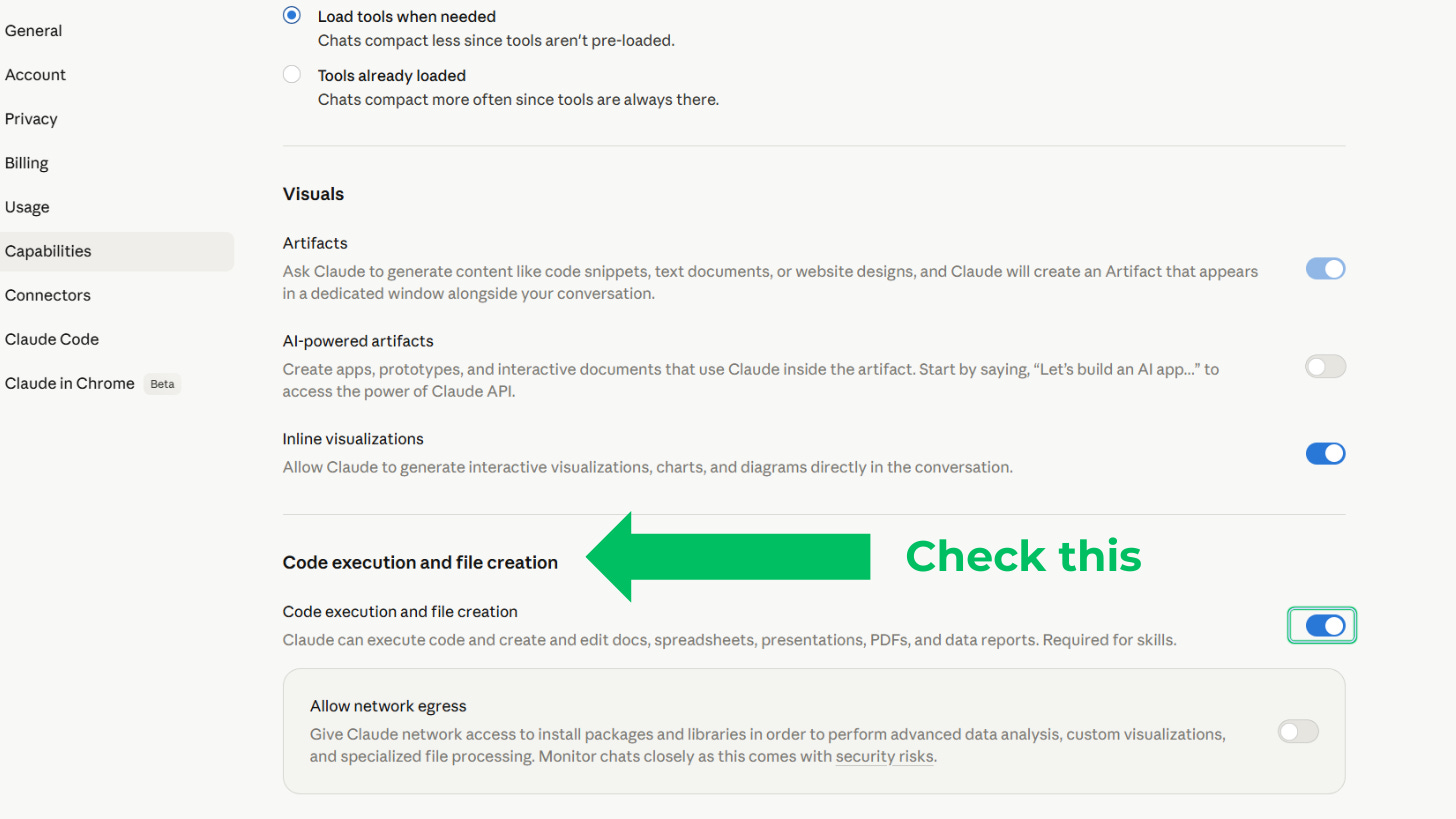
Code execution and file creation enabled (Settings → Capabilities → Code execution and file creation → toggle on)
Skill uploaded and toggled on
Research enabled
Web search enabled
Start a new chat
The download instructions for the Special Situations Screener Skill are at the end of this article. Once you have it, follow the following steps:
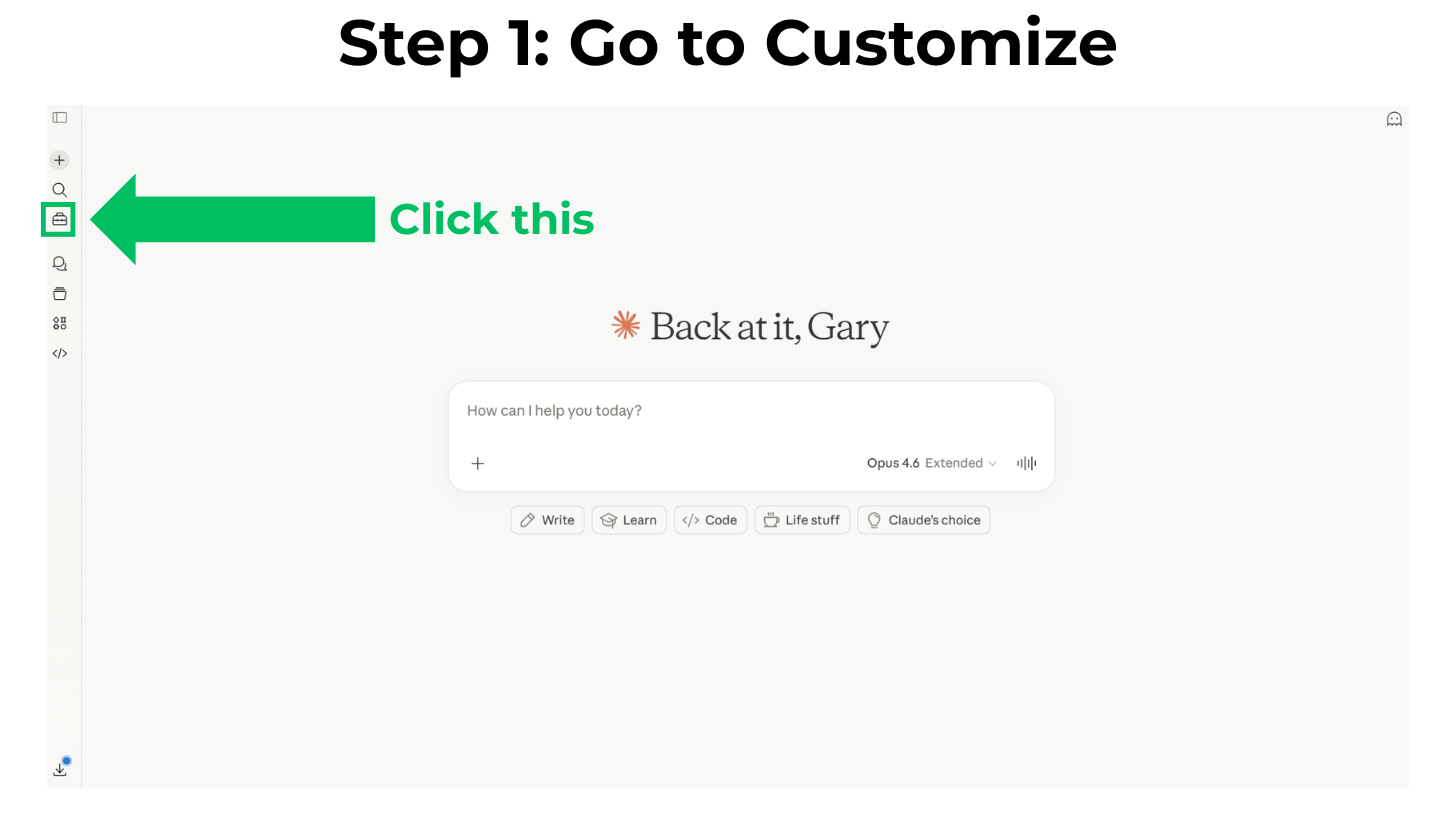
Step 1: Go to ‘Customize’
In your Claude web interface, find the little suitcase icon on the left bar and click on it.
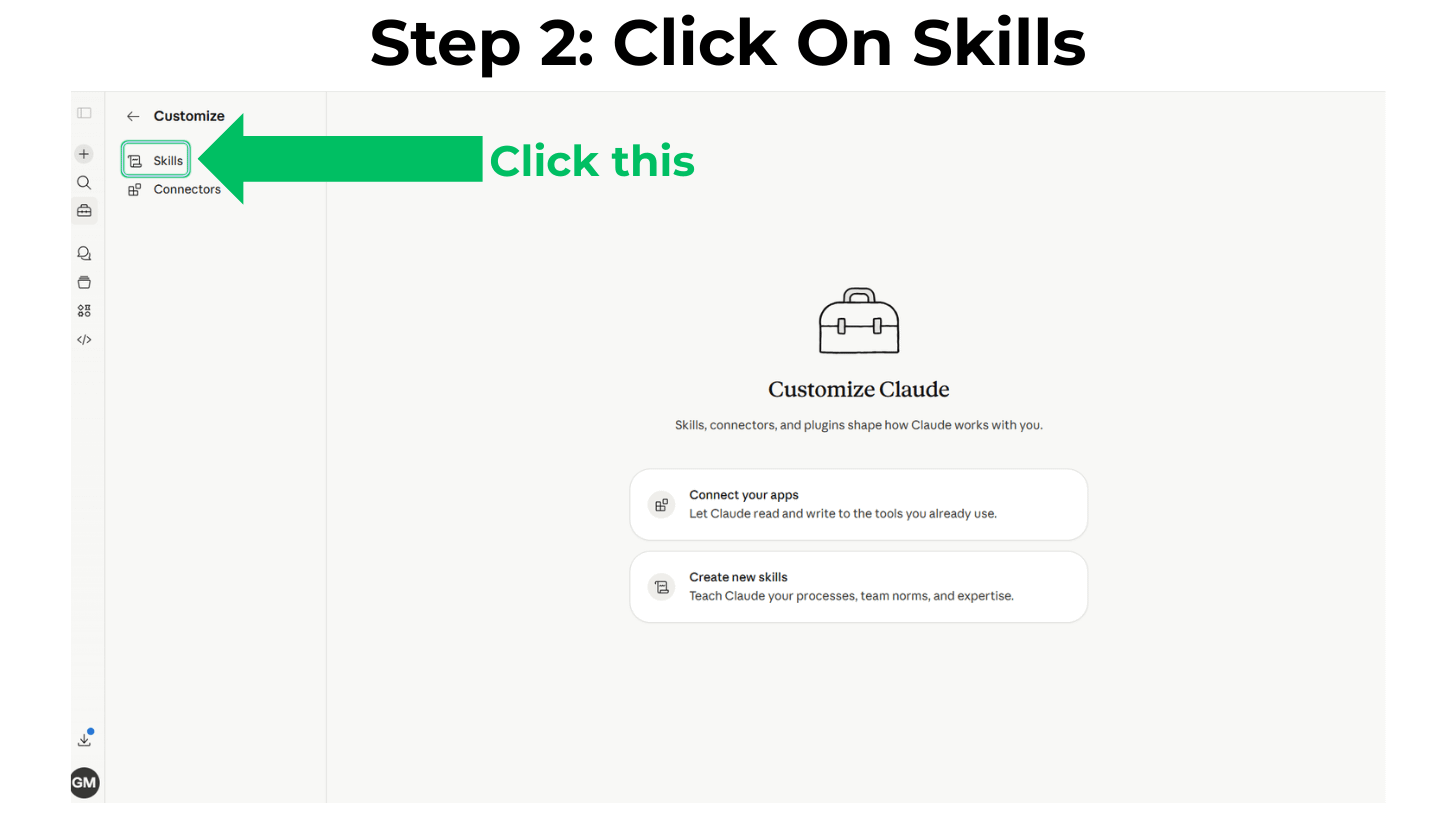
Step 2: Click on ‘Skills’
You will be given a choice of ‘Skills’ or ‘Connectors.’ Click on ‘Skills’
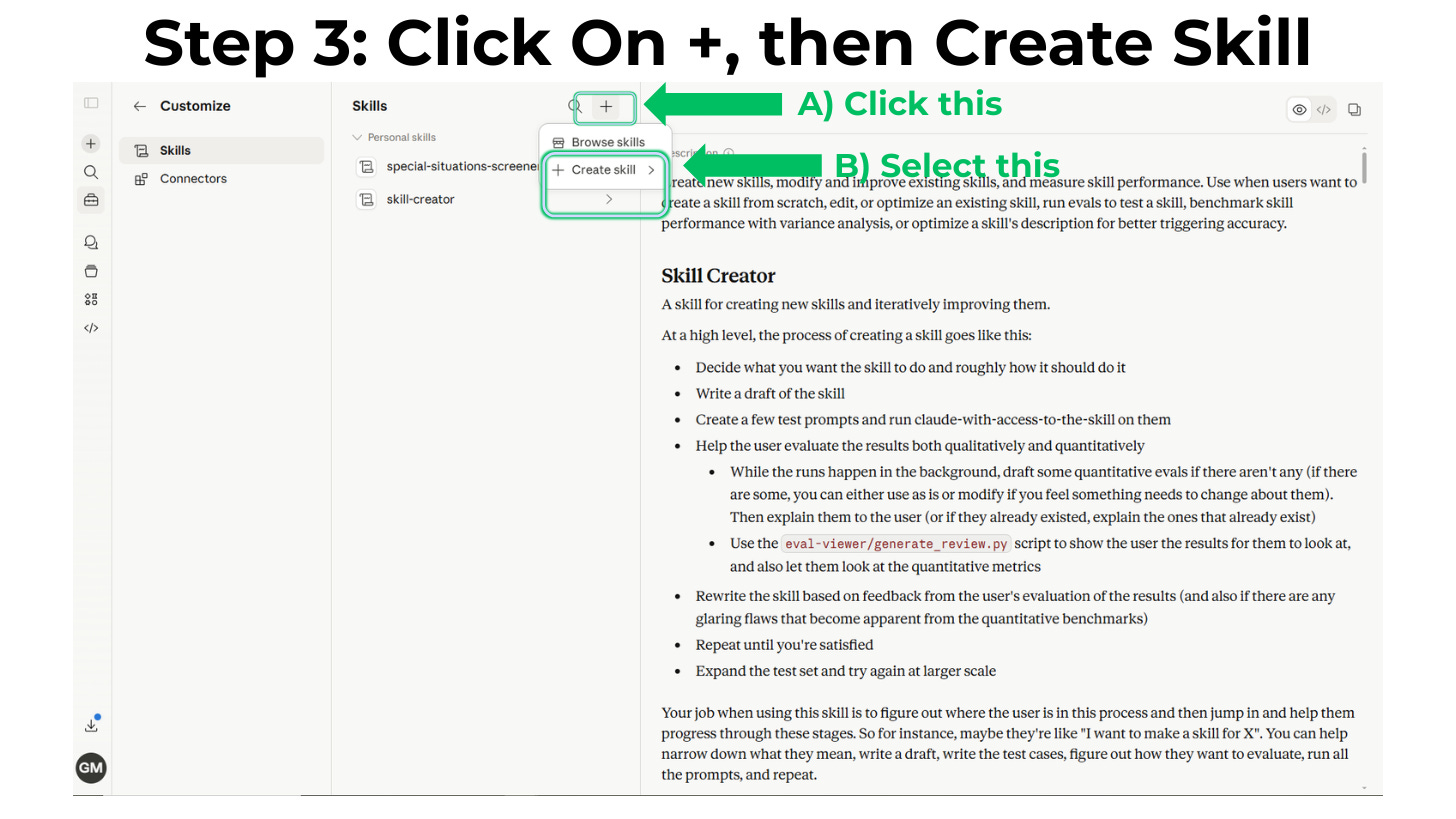
Step 3: Click on ‘+’
Click on the ‘+’ icon and then click on ‘Create Skill’
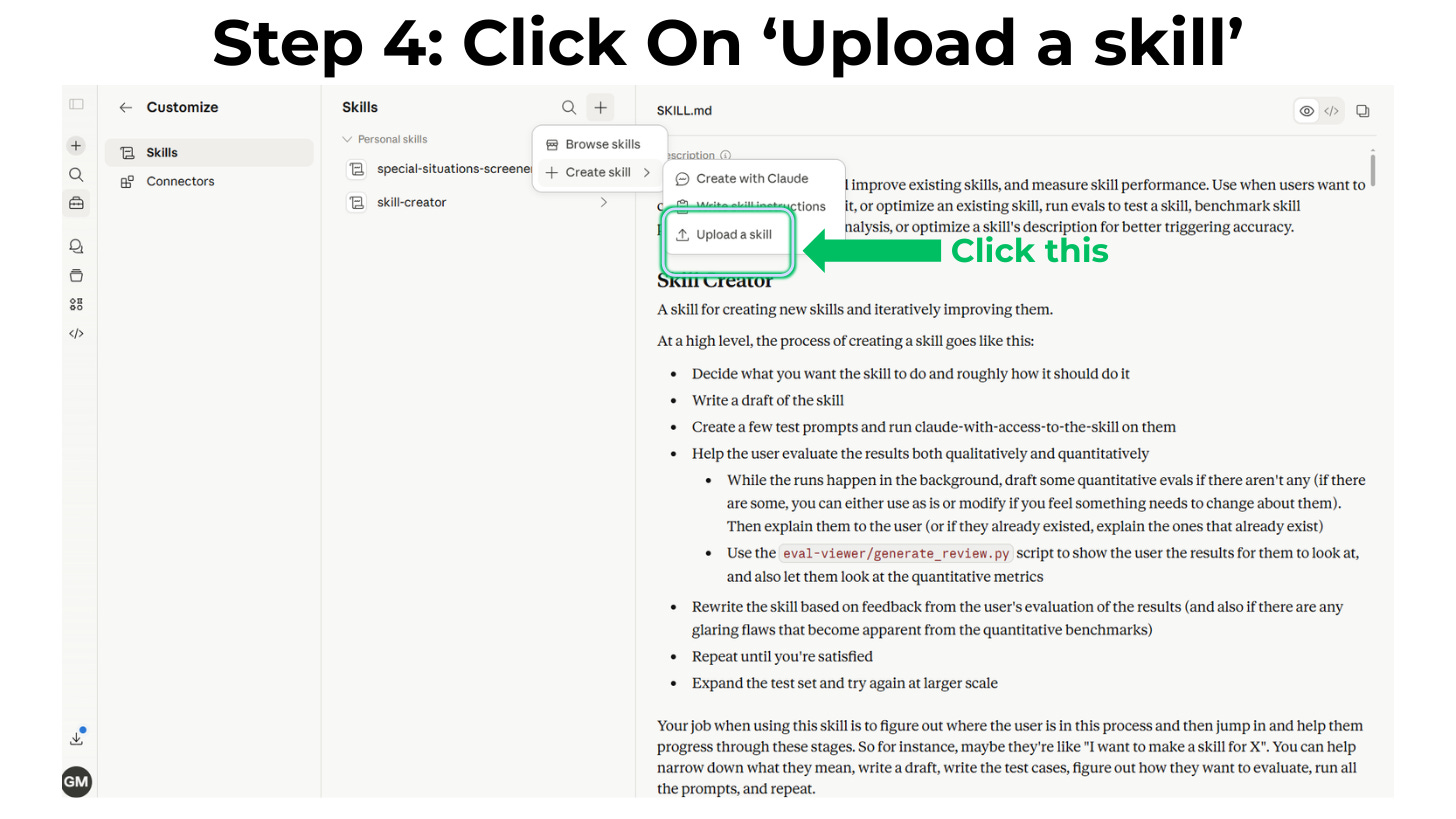
Step 4: Click on ‘Upload a Skill’
If you already have the Skill file (and you will have access to one by the time you are done with this article), click on ‘Upload a skill’
Step 5: Upload the Skill
Your Skill should be either a single .md file or a single .skill file (the latter being the case for the Special Situations Screener Skill). Select it and upload it here.
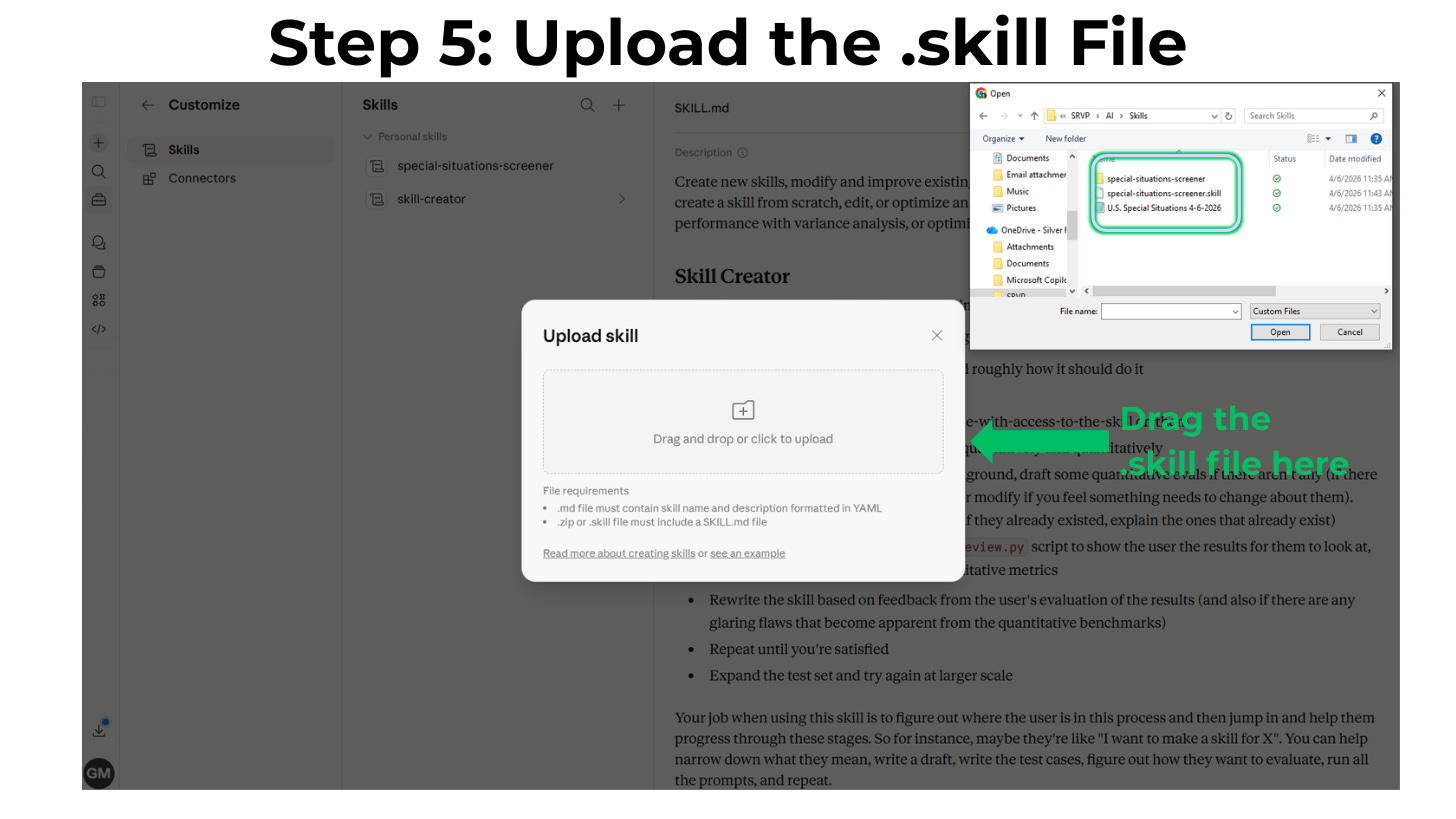
Your Skill should now be loaded into Claude. Start a new Claude chat, and you are ready to use it.
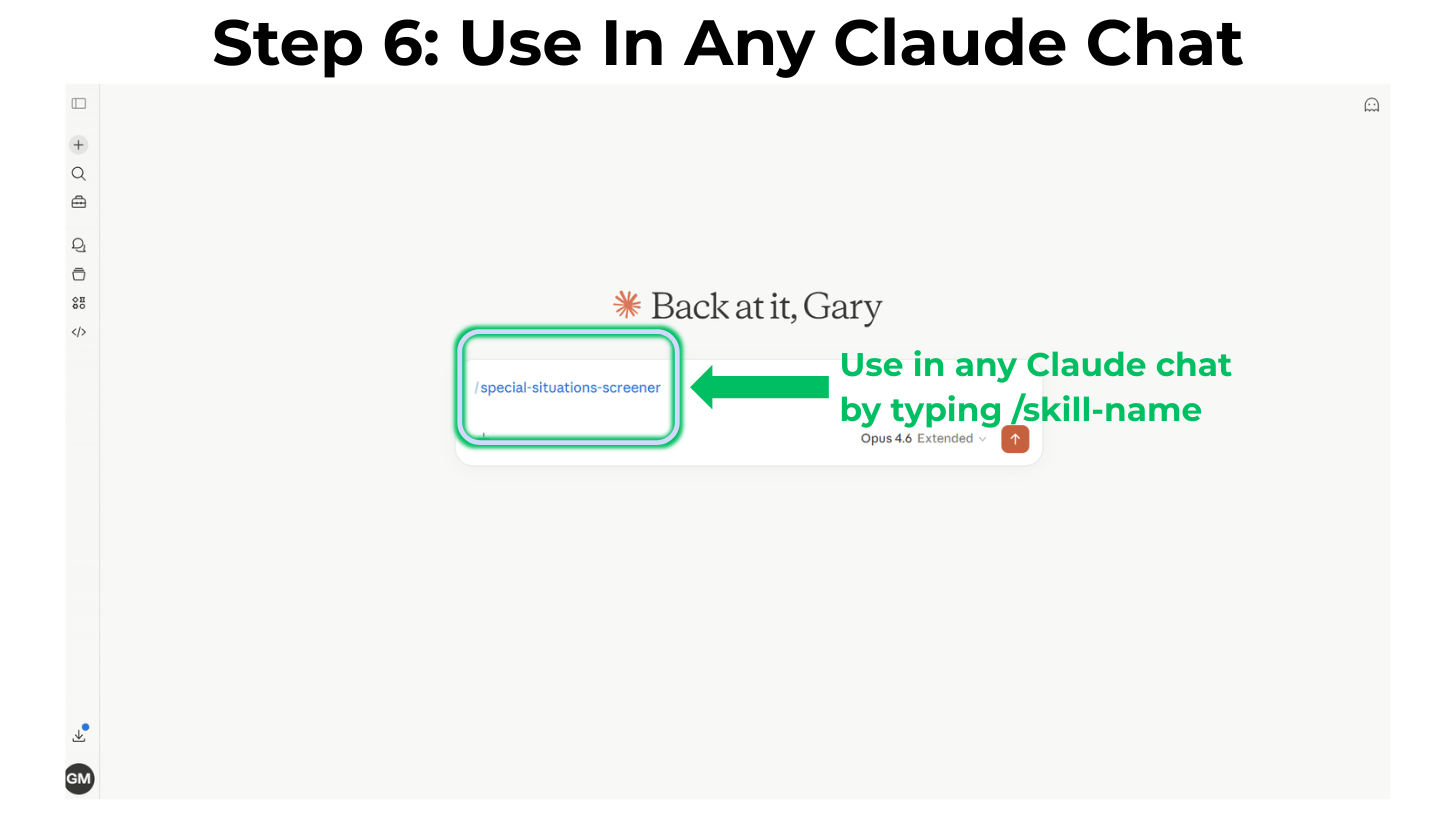
Step 6: Invoke the Skill
Claude Skills can be triggered based on your prompt language making Claude believe the Skill should be used, or explicitly by typing ‘/’ and then picking the Skill or typing the full ‘/skill-name’. To invoke the Special Situations Screener Skill you would type:
/special-situations-screener
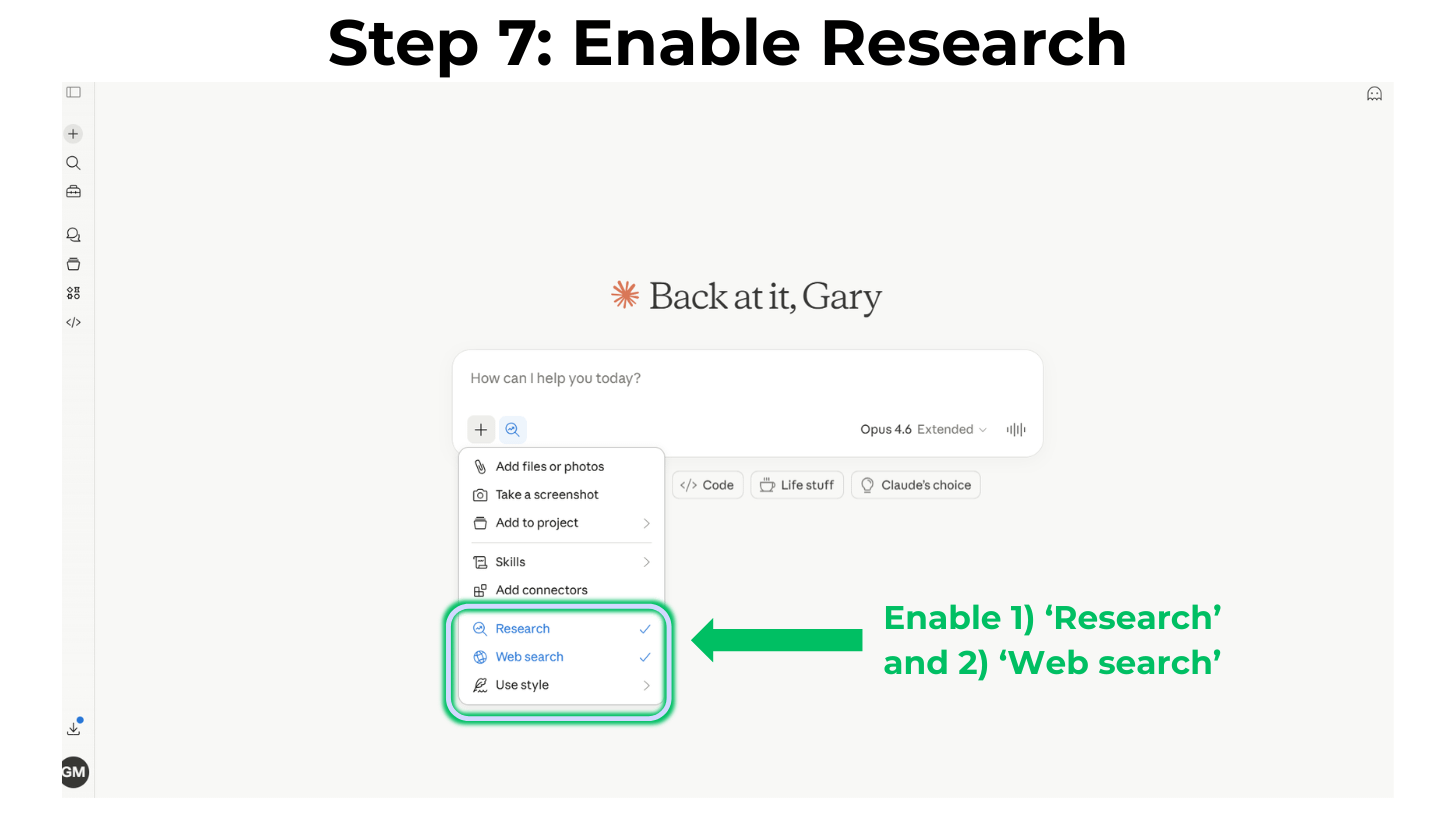
Step 7: Enable Research and Web Search
The Skill is intended to search the Internet very thoroughly for special situations, so the ‘Research’ option needs to be selected so that Claude knows that it needs to look broadly. The ‘Web search’ option also needs to be toggled on.
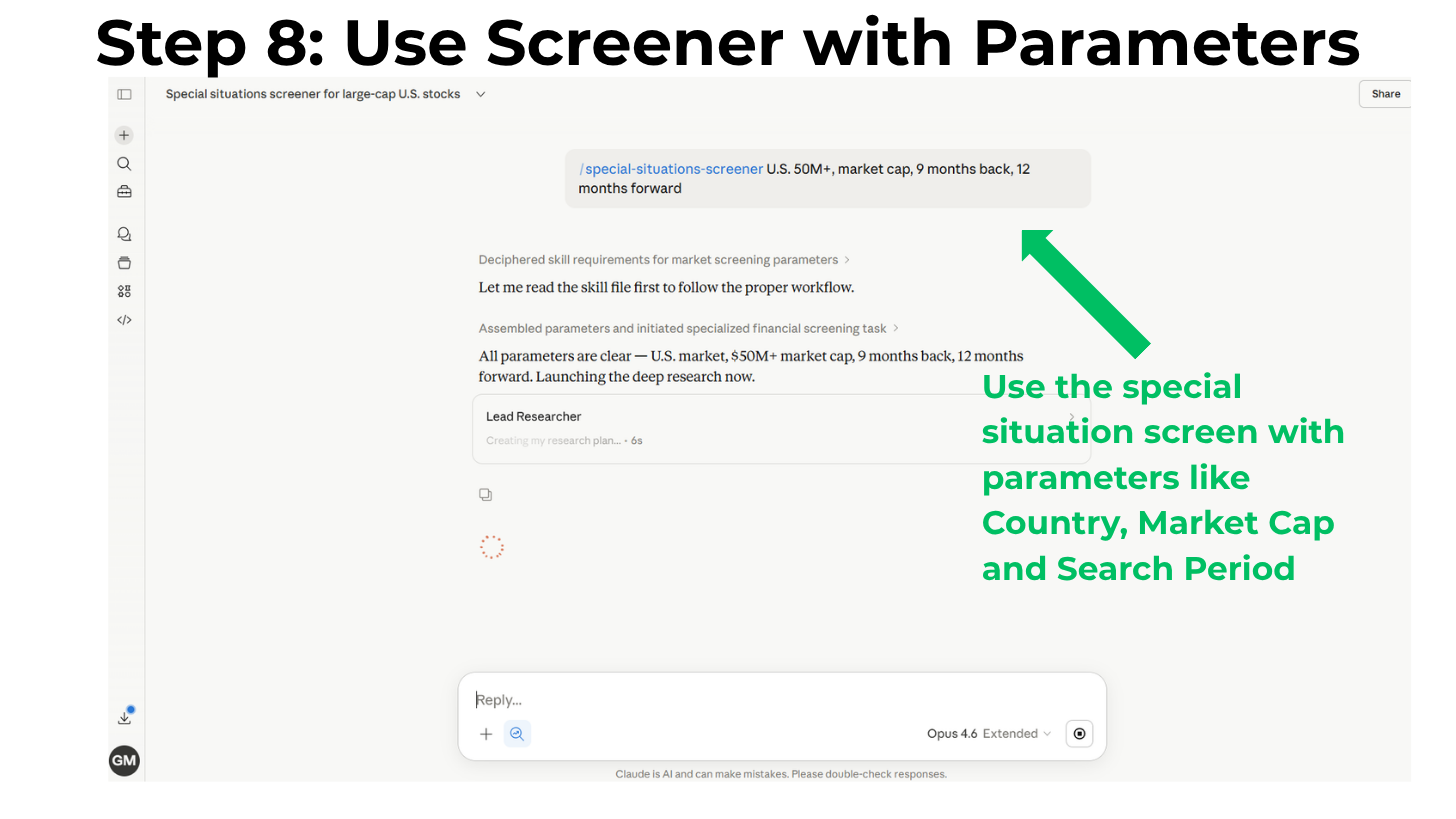
Step 8: Example
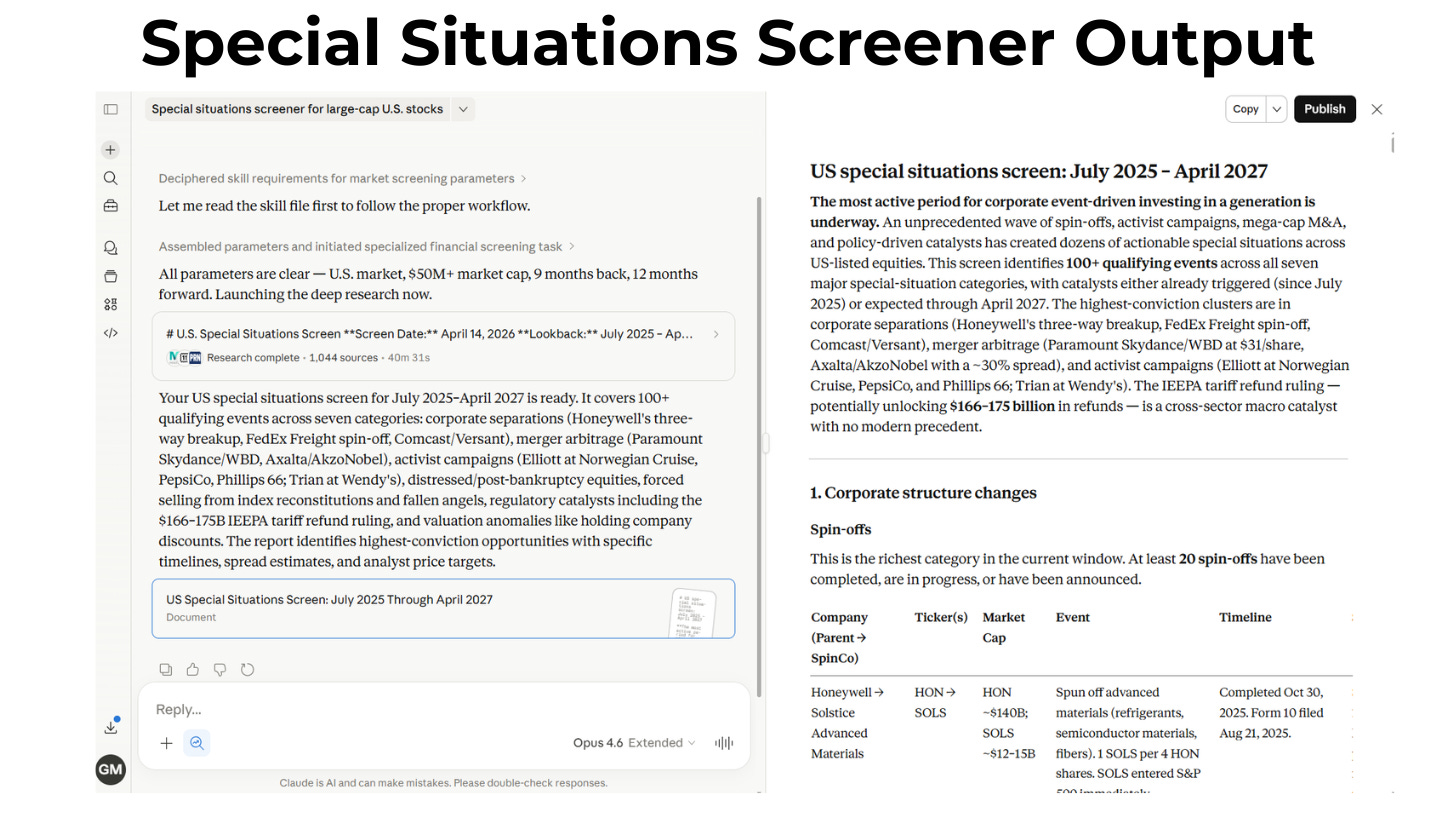
Once you have ‘Research’ and ‘Web search’ enabled, this is an example of how you would run the screener for U.S. companies with a market cap above $50M, looking 9 months back and 12 months forward:
/special-situations-screener U.S., $50M+ market cap, 9 months back, 12 months forward
Step 9: Output
Be prepared, this is a long research project and should take 30 to 60 minutes to run. Once it does, you will receive a formatted markdown file with special situations by category that you can convert to a PDF if you wish:
A few things to watch out for if you have trouble running this Skill:
Start a new chat before running this Skill
Make sure you are logged into Claude with a paid subscription, Pro or higher
If the Skill stops mid-run and asks you to hit ‘Continue’ due to internal Claude web constraints for tool use, just hit ‘Continue’ and the Skill should finish
If it does not run at all after you install it, check that the Skill is toggled on under ‘Customize’ -> ‘Skills’ -> ‘special-situations-screener’
Go to the ‘Capabilities’ section, scroll down to the ‘Code execution and file creation’ sub-section and make sure it’s toggled on:
Hopefully this has been a helpful introduction to you for how to easily use Claude Skills to improve your investing. I am sure that this Skill isn’t perfect, and I would appreciate your feedback for what works well and what needs to be improved. However, I have found it to be useful and have incorporated it into my idea generation process.
The paid tier of the Behavioral Value Investor Substack exists to help serious investors improve their process. Paid subscribers get this Skill and most of the future AI tools and techniques that I plan to share as part of their subscription. If you’re not yet a paid subscriber, you can purchase the Skill on its own, or join the paid tier and get this plus every tool and technique I release going forward.
You can get the exact .skill file that is ready to be installed here. The 100% discount code for paid subscribers (no credit card required):